Bot
Combat Assist is Forsaken World's built-in automation system — configurable skill rotation, auto-loot, potion thresholds, and party support. Great for grinding kill quests and farming materials.
Overview
Combat Assist is Forsaken World's built-in automation system — a part of the game client that lets your character fight, loot, drink potions, and support its party automatically. It's perfect for grinding repetitive content, clearing daily kill quests, and farming materials. As long as your character stays online with Combat Assist running and properly configured, it keeps working on its own.
How to Open Combat Assist
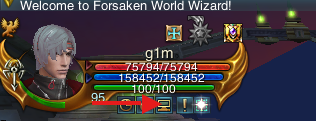
The window has four tabs — Combat, Looting, Protection, and Party — plus Start, Reset, and Help along the bottom.
Combat — what to fight
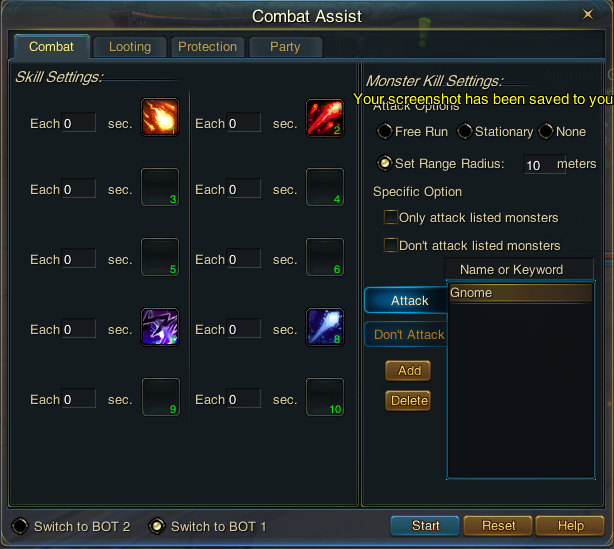
Monster Kill Settings controls where and who you fight. The Attack Options decide movement:
- Free Run — the character ignores its start position and keeps chasing the nearest monster.
- Stationary — after each kill the character returns to the spot where you pressed Start (unless blocked by terrain).
- None — no attack skills are used, but the other automatic actions (potions, blessings, etc.) still run.
- Set Range Radius — define a radius in meters around the start point; if the character wanders out, it's pulled back.
Under Specific Option, tick Only attack listed monsters or Don't attack listed monsters to use your target lists. Build a list by typing a monster's Name or Keyword (a partial name matches every monster containing that text), choosing the Attack or Don't Attack list, and clicking Add (or Delete to remove).
Looting — what to pick up
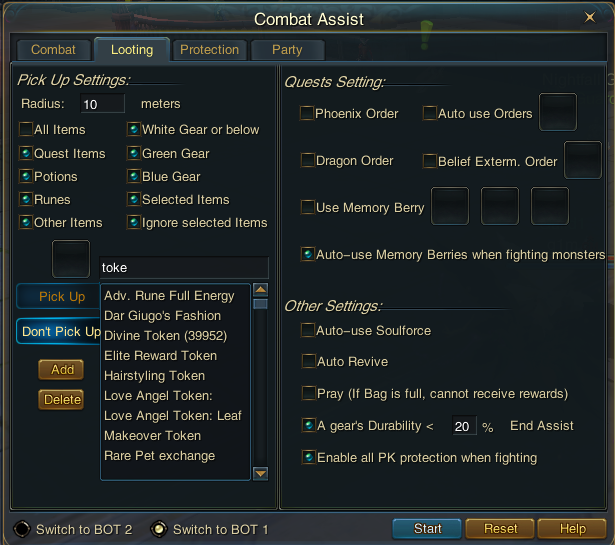
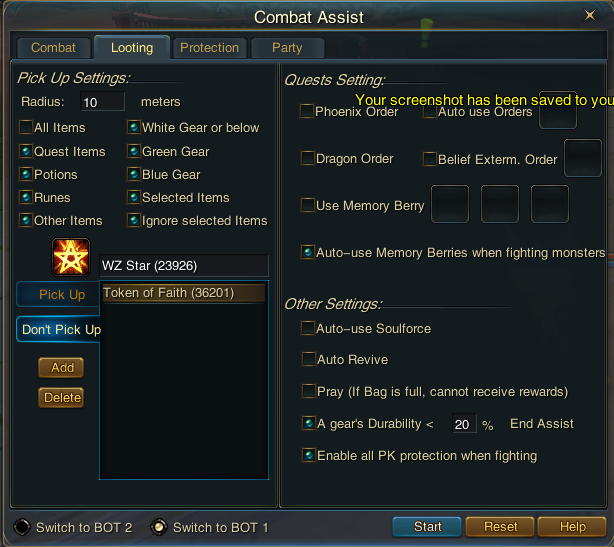
Quests Setting automates hunting and faith orders. Tick Phoenix Order, Dragon Order, or Belief Exterm. Order, drop orders into the Auto use Orders slots, and use the Use Memory Berry slots for memory berries — with Auto-use Memory Berries when fighting monsters if you want them consumed mid-combat.
Other Settings rounds out a hands-off session:
- Auto-use Soulforce — spends Soulforce automatically as it builds up.
- Auto Revive — revives the character after death so the run continues.
- Pray (If Bag is full, cannot receive rewards) — auto-prays for rewards; note a full bag blocks them.
- A gear's Durability < __% End Assist — if any equipment piece drops below the set durability, the assist stops so you don't grind on broken gear.
- Enable all PK protection when fighting — never targets other players or their pets, so you can't accidentally rack up PK points.
Protection — staying alive
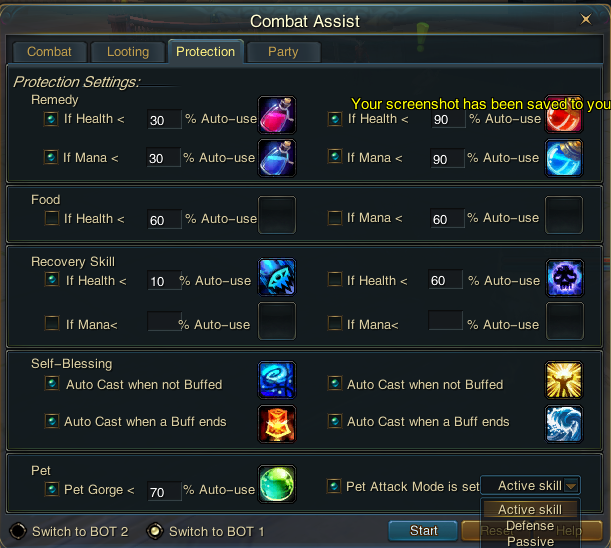
- Remedy — slots for HP and MP potions at two thresholds each (for example a strong potion at low health and a lighter one higher up). They fire automatically when Health or Mana drops below the percentage you set.
- Food — culinary items eaten while resting, when Health or Mana is below the set percentage.
- Recovery Skill — restorative skills cast at the Health (or Mana) percentages you choose; you can set both an emergency low threshold and a top-up one.
- Self-Blessing — buffs re-applied to the character, either Auto Cast when not Buffed or Auto Cast when a Buff ends.
- Pet — set Pet Gorge < __% to auto-feed your pet, and pick its Pet Attack Mode: Active skill, Defense, or Passive.
Party — supporting your group
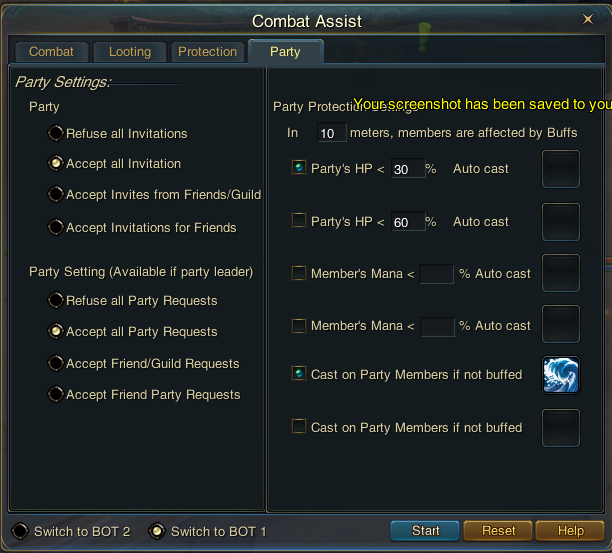
Party Protection turns your character into an automatic supporter. Set the range at the top — In __ meters, members are affected by Buffs — then assign skills to fire when Party's HP < a percentage or a Member's Mana < a percentage, and use Cast on Party Members if not buffed to keep group buffs up. Keep the range sensible: members outside it are skipped.
Tips
- Start with Set Range Radius at a comfortable distance — it keeps your character from chasing a mob halfway across the map.
- Always fill at least one Remedy slot and set A gear's Durability < % before you step away; that pair protects both your character and your gear.
- Put your strongest attack on the first Skill Settings slot with interval 0, and small intervals on the rest, so your best skill never gets skipped.
- Save a grinding profile on BOT 1 and a party-support profile on BOT 2 so you can switch roles instantly.
FAQ
Q: Is using Combat Assist allowed? A: Yes — it's a built-in part of the game client, not a third-party program. Open it and use it freely.
Q: What does Combat Assist actually do? A: It runs your character automatically — using the attack skills you choose against the targets you list, looting, drinking potions, healing, buffing, and supporting your party, all on configurable rules.
Q: Does it work for daily quests? A: For kill quests, yes — pull the target, press Start, and come back when it's done. It can't handle quests that need puzzle-solving or NPC dialogue.
Q: My skills keep getting skipped — why? A: Each skill has its own Each __ sec. timer, and a skill due while another is firing gets skipped. Lower the interval (or set it to 0) on the skill you want used most.
Q: The hotkeys (especially Shift-Z) don't work — how do I fix it?
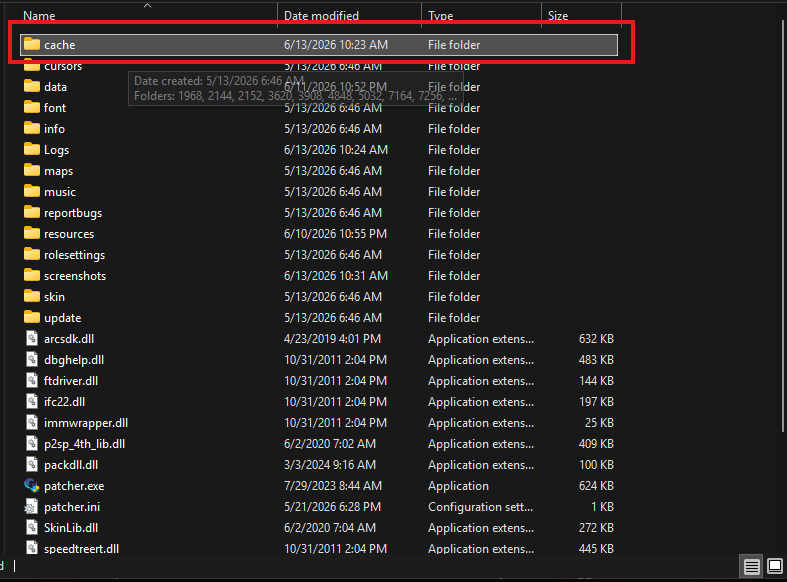
A: This is a common client hiccup, and it's an easy fix. Fully close the game, open your game client's main folder, delete the cache folder, then restart your computer and launch the game again. The cache rebuilds on its own and the hotkeys should respond normally.
See Also
- Daily Quests — the main use case for Combat Assist
- Activity Points — reward currency earned from many activities
- Main site: Class guides